
One plugin. Everything an agency needs.
AgenciesWP packs 70+ features across 8 categories — from client management to Stripe payments. Each is purpose-built for freelancers and agencies running their business on WordPress.
Client management
Every client gets a unique ID, secure portal access, and a complete financial record — all from your real-time admin dashboard.
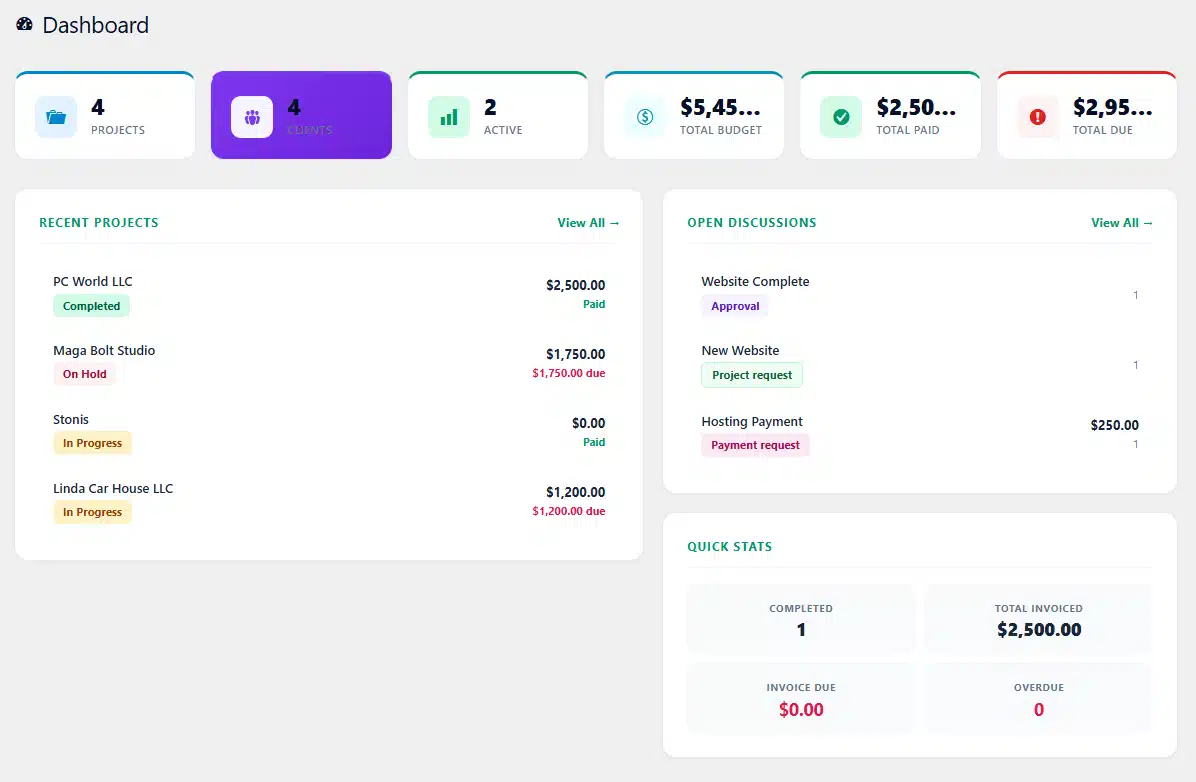
↑ Real admin dashboard — Projects, Clients, Total Budget, Paid & Due at a glance, plus Recent Projects and Open Discussions.
Unique Client IDs
Every client gets an auto-generated ID like CL393866. Use it alongside their email for portal login.
Magic-link emails
Auto-send a portal login email when you create a new client. They click and they’re in — no password setup.
No WordPress account needed
Clients log in to the portal with email + Client ID. They never touch your WP admin or create WP users.
Per-client revenue
See total billed, paid, and outstanding for each client at a glance. Sort by lifetime value or unpaid balance.
Search & filter clients
Search across name, email, company, or ID. Filter by active or inactive status to find anyone in seconds.
Notes per client
Attach unlimited notes to each client record. Phone calls, meeting notes, special requirements — all in one place.
Active / Inactive status
Mark clients inactive when projects end — keep their history without cluttering your active client list.
Send portal link anytime
Lost the login email? Resend the portal access link with one click from the client edit screen.
Address & contact info
Store full company details — name, address, phone, billing email — automatically pulled into every invoice.
Project management
Run unlimited projects with budgets, milestones, files, and team assignments — built for both fixed-price and hourly billing.
Fixed or hourly billing
Set a fixed total upfront, or use hourly mode where the budget grows automatically as your team logs time.
Project status flow
Five built-in statuses: Pending, In Progress, On Hold, Completed, Cancelled. Color-coded everywhere.
Visual milestone timeline
Add unlimited milestones with due dates. Status dots show completion. Progress bar updates live.
Priority levels
Tag projects Low, Medium, High, or Urgent with colored badges. Sort and filter by priority.
Start & due dates
Set both start and due dates. Overdue projects highlight in red automatically across all dashboards.
File uploads per project
Upload PDFs, images, mockups, briefs. Files are tagged by uploader and date. Visible to client too.
Progress percentage
Manually set the progress % per project. Shows as a colored bar everywhere — admin and portal.
Filter & search
Filter by status, client, priority, or due date. Find any project in your list of 50+ in seconds.
Per-project P&L view
See accrued hours cost, invoiced amount, paid, and outstanding side-by-side on every project page.
Time tracking & auto-billing
The only WordPress agency plugin where logged hours flow directly into the project budget and the invoice.
Time entries per project
Log date, staff member, hours, hourly rate, and description for every block of work. Edit anytime.
Per-staff hourly rates
Each team member can have their own hourly rate. Designers $80/hr, developers $120/hr — your call.
Live budget accrual
The project budget updates the instant a time entry is saved. Always know what’s accrued vs invoiced.
Default rate in settings
Set a global default hourly rate. Pre-fills every time-log form so you don’t re-enter it constantly.
Edit & recalculate
Made a mistake? Edit or delete any time entry. The project budget and totals recalculate automatically.
One-click invoice import
When you create an invoice, check the time entries you want to bill and they import as line items.
Total billed view
Project page shows total hours and total billed amount at a glance — instant project profitability check.
Multi-staff logging
Three team members on one project at three different rates? Time tracks each independently and sums them.
Hours logged stats
Total hours per project, per staff member, per period. See who’s most productive — and where time goes.
Invoicing & Stripe payments
Build pro invoices, accept Stripe payments from the portal, and track every dollar — without leaving WordPress.
5 line-item types
Service, Hourly, Fixed Item, Expense, and Discount — mix any combination on a single invoice.
Stripe integration
Add your Stripe Publishable + Secret keys. Clients pay invoices with one click from the portal.
Live client balance
The yellow Client Balance panel shows real-time invoiced / paid / outstanding before you finalize.
Tax & discount fields
Apply tax rate and discounts at the invoice level. Or use Discount as a line-item for partial credits.
Invoice statuses
Draft, Sent, Paid, Partial, Overdue, Cancelled — clear visual flow with color-coded badges.
Auto invoice numbering
Customizable prefix (INV-) plus auto-incrementing number. Set the format once in Settings.
Notes per invoice
Add custom notes shown to the client — payment terms, thank-yous, special instructions, anything.
Print-ready PDFs
One-click print to PDF with your company logo, full client details, and clean professional layout.
Payment requests
Need a deposit or hosting fee? Send a payment request with optional Stripe — separate from invoices.
Auto overdue marking
Invoices past their due date automatically flip to Overdue status with red highlighting site-wide.
Invoice list & filter
Filter by status, client, or date range. Search by invoice number. CSV export everything.
Logo on every invoice
Upload your company logo once in Settings. It appears at the top of every PDF invoice automatically.
Contracts & e-signature
Replace DocuSign with built-in contract creation, sending, and typed-signature capture. Optional per project.
Rich-text editor
Use the same WordPress editor you know — headings, bold, links, lists. Drop in clauses or full agreements.
Send unique signing link
One click and the client gets a private signing URL. They sign without ever logging in to WordPress.
Typed signature
Client types their full name in a signature box. The plugin renders it in elegant italic and locks it.
Timestamp + IP capture
Every signature is logged with the exact date/time and IP address — full audit trail for legal disputes.
Status flow
Four built-in statuses: Draft, Sent, Signed, Declined. Filter and view at a glance from the Contracts page.
Completely optional
Contracts aren’t required to start a project. Use them when you need legal protection — skip when you don’t.
Link to specific projects
Attach a contract to a project so the Project page shows the contract status and signed date.
Contract history per client
See every contract ever signed by a client — signed, sent, drafted, or declined. Searchable history.
Decline flow
If a client declines, they can leave a reason. The status updates and you get notified to revise.
White-label client portal
Drop one shortcode on a page. Your clients get a beautiful, branded portal with 8 sections that match your theme.
Single shortcode
Paste
Client Portal
Sign in with your email and Client ID.
Fully responsive
Looks polished on phone, tablet, and desktop. Clients check projects on the go — no app needed.
8 portal sections
Dashboard, Projects, Invoices, Payments, Approvals, Discussions, Contracts, and New Request.
Project approval / deny
Clients formally approve completed projects with feedback. Or deny with a reason — full record stored.
Threaded discussions
Feature requests and change requests get their own conversation threads. Close when done. Filter by type.
Submit new requests
Clients can submit new project requests with budget and timeline. Or open a feature/change request.
Pay with Stripe
Invoices and payment requests show a green “Pay with Stripe” button. One click — done in 30 seconds.
Sign contracts in portal
Clients view the full contract, type their name, and submit. No external service needed.
File upload from client
Clients can upload assets to their project — logos, content, references. Tagged as “Client” file.
Sign out securely
HTTPS-only cookies. Sign-out button instantly expires the session server-side, not just in the browser.
Matches your theme
Uses your site’s typography, colors, and theme styles. No “looks plugin-ified” — it looks like part of your brand.
Unread notification badges
Red badge on tabs with new activity. Clients see at a glance where the team needs them.
Team & role-based access
Add unlimited team members at zero extra cost. Three smart roles ensure everyone sees exactly what they should — nothing more.
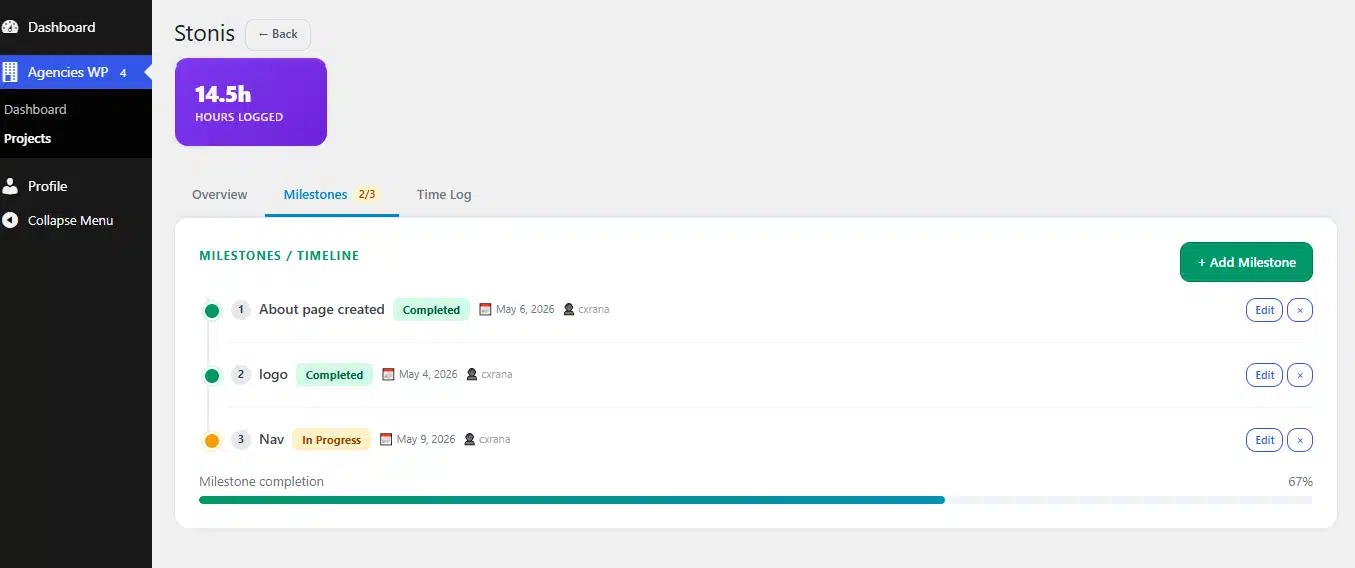
↑ Developer role — sees only Dashboard & Projects. Their assigned tasks, active count, and completed projects. No financial data.
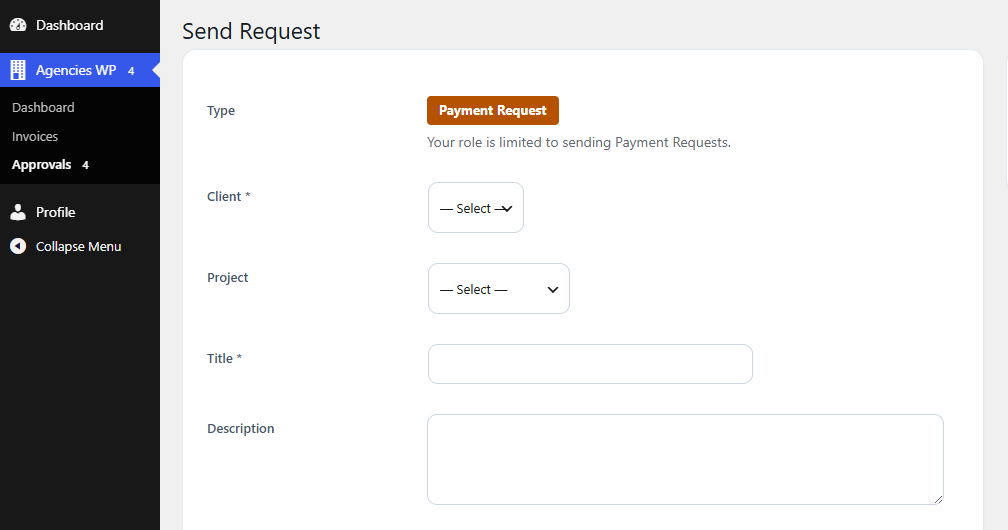
↑ Accountant role — sees Invoices and Approvals only. Can send payment requests. Cannot access project details or settings.
Unlimited team members
Add 1 person or 50. There’s no per-seat fee, ever. One license covers your entire team.
Admin role
Full access to everything — clients, projects, invoices, settings, backups, role assignment.
Developer role
Sees only their assigned projects. Can log time and update milestones. Cannot see other clients’ work.
Accountant role
Sees only invoices, payments, and reports. Can send payment requests. Cannot edit project details.
Per-project Lead role
Within a project, one team member is the Lead — gets a purple badge in the team list and portal.
Reviewer role
Reviewer can view project but can’t edit. Perfect for QA staff or senior creative directors checking work.
Member role
Standard team member assigned to a project — can log time, update milestones, and upload files.
Easy per-project assignment
Click a project, open the Team tab, select staff members, choose their role. Save. Done.
Remove anytime
Staff leaving the project? Remove them with one click. Their logged time stays — just no future access.
Admin tools & reporting
Email notifications, JSON backups, reports, and integrations — everything you need to run AgenciesWP smoothly.
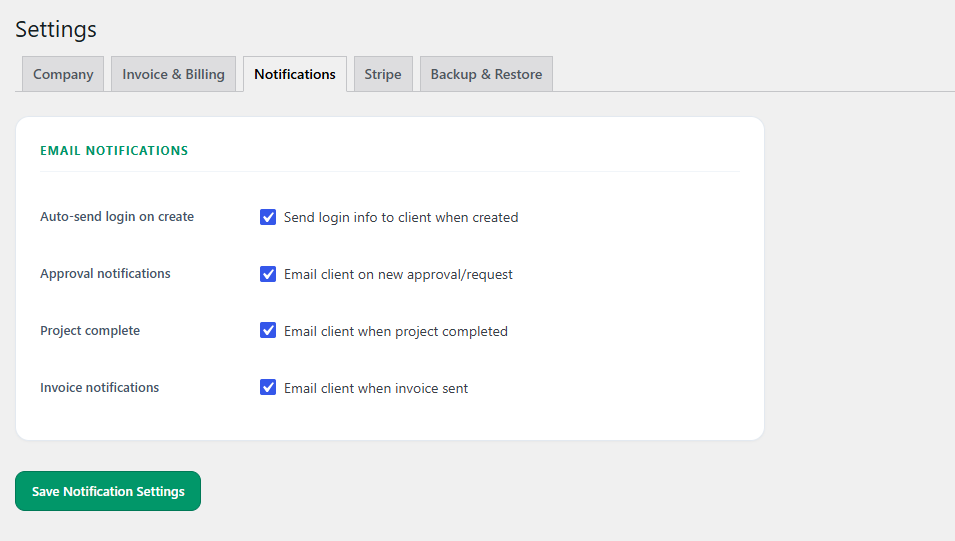
↑ Email notification controls — four granular toggles for client login info, approval requests, project completion, and invoice notifications.
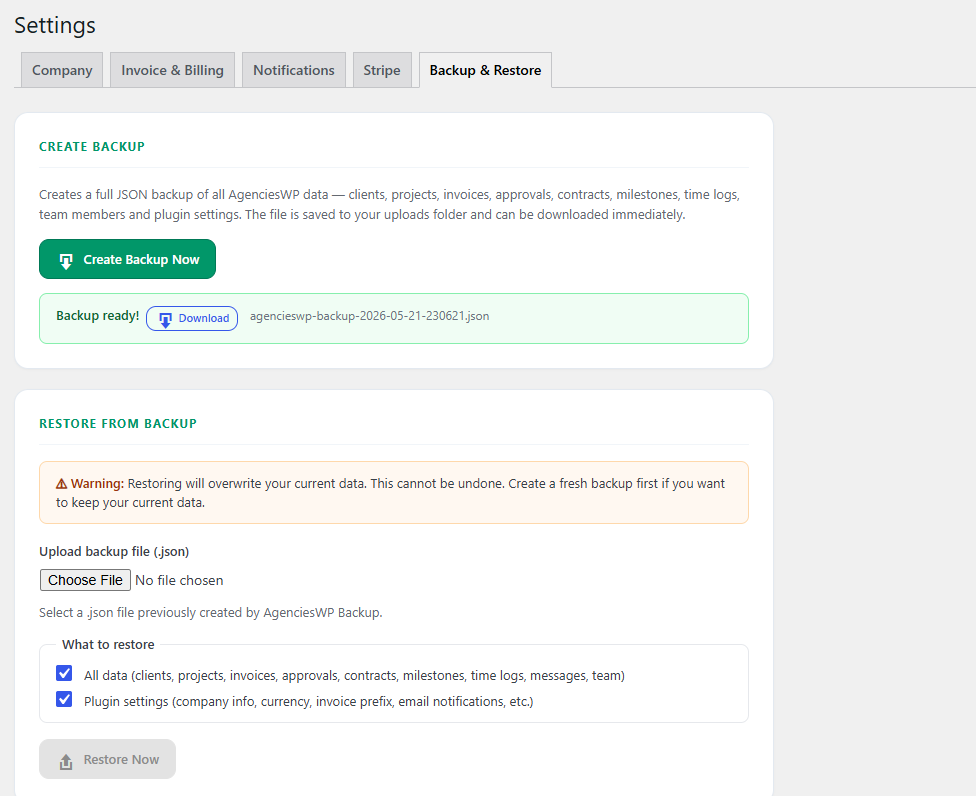
↑ Built-in JSON backup & restore — download a full data snapshot anytime. Restore lets you choose what to import. Last 10 backups kept on disk.
Reports dashboard
Revenue, Collected, Outstanding, New Projects, Completed Projects, New Clients — all in one view.
Date range filters
Today, This Week, This Month, This Quarter, This Year, or any Custom Range — instant report regeneration.
CSV export
Export reports, invoices, time logs, and client lists to CSV. Open in Excel or import to accounting software.
Print-friendly views
Print invoices, contracts, and reports with one click. Clean layout, your logo, ready for clients or filing.
JSON backup
One-click backup of all your data — clients, projects, invoices, contracts, time logs, settings.
One-click restore
Upload a backup JSON. Choose to restore data only, settings only, or both. Last 10 backups kept on disk.
Email notifications
Four toggleable triggers: client created, new approval, project completed, invoice sent. Granular control.
100% self-hosted
All data stays on your WordPress site. No external APIs, no analytics pings, no third-party data sharing.
Custom branding
Upload company logo, set currency & symbol, customize invoice prefix, default tax rate — all in Settings.
Currency & tax settings
Support any currency with custom symbol. Set default tax rate that applies to new invoices automatically.
Auto-create portal page
Plugin activation automatically creates the Client Portal page with the shortcode pre-installed. Zero setup.
Automatic schema updates
Plugin updates apply ALTER TABLE automatically — your data is preserved through every version upgrade.
One plugin. Every feature your agency needs.
Stop juggling 5 SaaS subscriptions and paying $200+/month. Join 1,200+ agencies running everything from WordPress.
Loved by agencies worldwide.
From solo freelancers to 20-person studios. Here’s what they’re saying.
Emma Mitchell
Replaced FreshBooks and Bonsai for my 3-person studio in week one. The client portal alone saves me 6 hours a week of status update emails.
Marie Garibay
Time tracking auto-bills against the project budget. I finally know if I’m losing money on a fixed-price project before it’s too late.
Sara Kowalski
Stripe integration is the killer feature. Clients pay invoices in 30 seconds instead of forwarding them to accounting. My cash flow doubled.
Ready to run your agency from WordPress?
Join 320+ agencies who ditched the SaaS treadmill. One annual license. Self-hosted forever.