

TL;DR
Recurring invoices let you set up a retainer once and have the invoice created automatically every week, month or quarter. AgenciesWP includes recurring invoices and subscriptions inside the same self-hosted WordPress plugin you use for projects and client communication.
The problem with manual retainer billing
Monthly retainers are the most predictable revenue an agency has, yet many owners still copy last month’s invoice by hand. It is slow, easy to forget and awkward when a client asks why they were billed late. Automation fixes all three.

Setting up a recurring invoice
- Choose the client and project the retainer belongs to.
- Add the line items and amount.
- Pick the billing frequency and start date.
- Save. The plugin generates each invoice on schedule and shows it in the client portal.
Manage everything as subscriptions
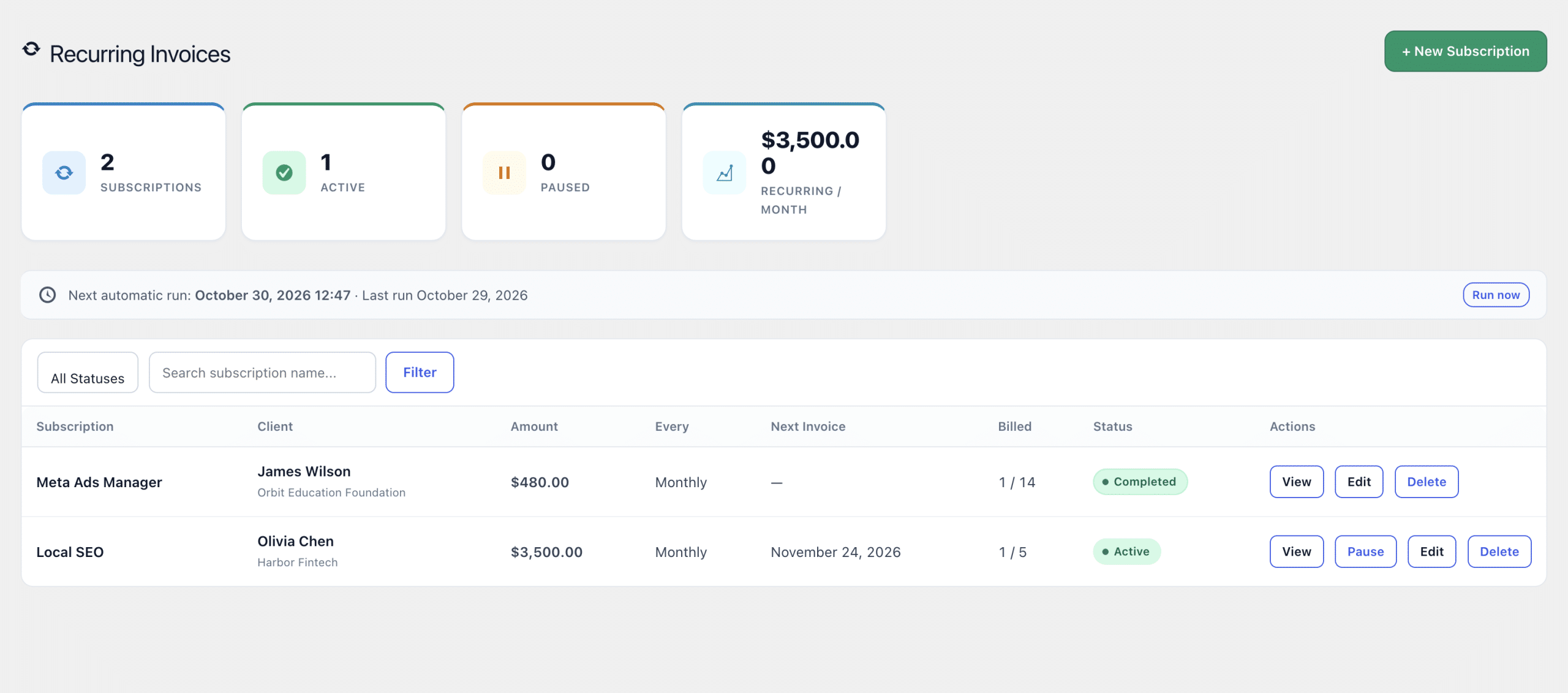
All your recurring billing is visible in one subscriptions list, so you can see who is on a plan, what they pay and what is coming next.
Best practices
- Bill retainers in advance, not in arrears.
- Combine recurring invoices with payment reminders.
- Review subscriptions quarterly and adjust pricing for scope changes.
- Offer an online payment method such as PayPal so clients pay on time.
Keep billing next to the work
Because invoices sit beside projects, time logs and messages, you can answer billing questions instantly. Explore the AgenciesWP features, check the pricing, or read the documentation for setup. For the bigger picture, see our WordPress client portal guide.
FAQ
Can clients see their upcoming invoices?
Clients see their invoices in the portal, and you manage subscriptions from the admin dashboard.
Is this better than a SaaS invoicing tool?
If you want billing, projects and client communication in one WordPress install that you own, yes. There is no separate login or monthly platform fee for another tool.
Who benefits most
Any agency with maintenance plans, SEO retainers, hosting packages or social media management has recurring revenue. Automating that billing saves hours every month and makes cash flow predictable.
Common mistakes to avoid
- Letting retainers run for years without a price review.
- Forgetting to pause a subscription when a client pauses work.
- Billing in arrears, which stretches your payment cycle.
- Having no reminder process when an automatic invoice goes unpaid.
Connecting billing to project work
When recurring invoices sit next to time logs, you can see whether a retainer is actually profitable. If a client consumes far more hours than the retainer covers, you have the data to renegotiate.
Example retainer setups
- SEO retainer: monthly invoice on the first of the month.
- Website care plan: quarterly invoice paid in advance.
- Social media management: monthly invoice with an optional ad spend line.
- Hosting and maintenance: yearly invoice with a renewal reminder.
Reviewing subscriptions
Once a quarter, open the subscriptions list and check scope, price and activity. Retainers that quietly grew in workload are the easiest revenue to recover.
FAQ
Can I change the amount later?
Update the subscription and future invoices follow the new amount. Details are in the documentation.
Where can I compare plans?
See pricing and the features page.
Discover more from AgenciesWP
Subscribe to get the latest posts sent to your email.


2 Comments